> This is part 1 of 2 of the full documentation (pages 1–100 of 163).
> The content is paginated: fetch every part to see all of it.
> Next part: https://docs.kindx.org/llms-full.txt/1
> Page index: https://docs.kindx.org/llms.txt
# KindX Project!
KindX brings nonprofits a comprehensive solution that integrates the functionalities of leading tools such as Salesforce, Slack, and G Suite/Outlook to provide you with a 360° view of your nonprofit.
### **Imagine having the power to combine the best tools used by Fortune 500 companies into a single platform, just like building blocks.**
At our core, we strive to empower nonprofit organizations by providing them with access to cutting-edge technologies that drive success for leading organizations worldwide. Our mission is to equip nonprofits with the tools they need to amplify their vision and make a significant impact in the communities they serve.
{% hint style="info" %}
**KindX tip:** A typical non-profit will be able to obtain more donations, cut down the operational costs and will be able to accomplish their mission to do more with less!
{% endhint %}
At KindX, we provide an Insights tool specifically designed to analyze your nonprofit's unique data. By examining donor giving patterns and behaviors, this tool offers valuable insights that support your organization in developing strategic lists for donor outreach. With these insights, you can make informed decisions and tailor your outreach efforts to effectively engage with your donors.
In addition to the Insights tool, our Intelligence tool includes built-in fundraising reporting capabilities. This feature enables you to track and analyze both historical and current fundraising progress. With comprehensive reporting tools at your fingertips, you can gain a deeper understanding of your fundraising performance and identify areas for improvement.
At KindX, we believe that data-driven decision-making is key to maximizing the impact of your nonprofit. Our Insights and Intelligence tools are here to empower you with the information and analysis you need to drive your fundraising efforts forward and achieve your goals.
KindX Nonprofit operating system is a comprehensive solution built on the Salesforce platform. It was developed by Kindcause.org to help other nonprofits to:
### **Be more COLLABORATIVE** **Be more EFFICIENT** **Be more PRODUCTIVE** **Do more GOOD!**
# What is KindX?
Nonprofit Operating System to Help Your Nonprofit Grow.
### **With KindX, we bring you a comprehensive solution for a nonprofit that integrates the functionalities of leading tools such as Salesforce, Slack, and G Suite/Outlook to provide you with a 360° view of your nonprofit.**
KindX platform, was developed by [KindCause.org](/about/kindcause.org), a 501(c)(3) nonprofit and [CFOsquared, Inc.](/about/cfosquared-inc.) a Salesforce partner. At [KindCause.org](/about/kindcause.org) we understand the challenges you face as a nonprofit owner. Limited resources, managing customer relationships, fostering collaboration among your team, and effective email communication are all crucial components of running a successful organization. That's why we've created a platform that combines the best features of these tools to empower your nonprofit.
First, KindX uses Salesforce, the most powerful customer relationship management (CRM) system. It allows your nonprofit to efficiently manage your interactions with donors, volunteers, and other stakeholders. You can track donations, monitor engagement, and build stronger relationships, all in one place. This helps you streamline your operations, enhance donor stewardship, and make data-driven decisions to further your mission.
Collaboration is key to your nonprofit's success, and that's where KindX integrates the power of [Slack](/overview/slack-your-digital-hq). With [Slack](/overview/slack-your-digital-hq), you can easily communicate and collaborate with your team members, volunteers, and partners. Share updates, coordinate tasks, and exchange ideas seamlessly within dedicated [channels](/overview/slack-your-digital-hq/creating-slack-channels). This fosters teamwork, enhances efficiency, and promotes a culture of collaboration that drives your nonprofit forward.
Email communication is vital for effective outreach and engagement. KindX integrates the functionalities of G Suite or Outlook with Salesforce. This integration saves you time and keeps your communication centralized for easy future access.
With KindX, you no longer have to juggle multiple platforms or struggle with data silos, as you can now have one source of data within Salesforce to provide you with a comprehensive and unified experience. You can gain a 360° view of your nonprofit, enabling you to make informed decisions, improve collaboration, and enhance your overall operational efficiency.
As a nonprofit key stakeholder, you deserve a solution that empowers you to focus on what matters most: advancing your mission and creating a positive impact. KindX is here to support you on this journey by providing an integrated platform that simplifies and enhances your nonprofit's operations.
Take a step forward and explore the possibilities with KindX nonprofit operating system that can help you do more with less. Let us help you unleash the full potential of your nonprofit, drive growth, and make a meaningful difference in the world.
# Why?
KindX is the comprehensive operating system for any nonprofit.
**Having a comprehensive operating system for a nonprofit is crucial because it helps streamline and integrate various essential functions and tools in one centralized platform.**
1. **Efficiency and Productivity:** A comprehensive operating system brings together multiple tools, such as CRM (Customer Relationship Management), collaboration tools like [Slack](/overview/slack-your-digital-hq), email functionality similar to G Suite or Outlook, project management tools, and integration with accounting systems. By having all these functions in one system, nonprofit staff can access and manage everything they need from a single interface, saving time and reducing the need to switch between different applications.
2. **Seamless Data Flow:** With a comprehensive operating system, data flows seamlessly between different functions. For example, when a donor's information is entered into the CRM, it can be automatically synchronized with the email system and project management tool. This integration eliminates manual data entry, reduces errors, and ensures that information is consistent and up to date across all systems.
3. **Enhanced Collaboration:** Collaboration tools like [Slack](/overview/slack-your-digital-hq) integrated within the operating system facilitate real-time communication and collaboration among staff members. They can share updates, discuss projects, and exchange information without the need for separate communication tools. This promotes teamwork, improves coordination, and fosters efficient collaboration within the organization.
4. **Streamlined Project Management:** The inclusion of project management tools in the operating system allows nonprofits to plan, track, and manage projects effectively. Staff members can create project timelines, assign tasks, monitor progress, and collaborate on projects within the same system. This improves project visibility, ensures accountability, and enables efficient project execution.
5. **Holistic Financial Management:** Integration with accounting systems enables nonprofits to manage their finances seamlessly. They can track donations, manage expenses, generate financial reports, and ensure accurate financial records without the need for separate accounting software. This integration saves time, improves accuracy, and provides a comprehensive view of the organization's financial health.
6. **Data-driven Decision Making:** With all functions integrated within the operating system, nonprofits have access to comprehensive data and insights. They can generate reports, analyze trends, and gain a holistic view of their operations. This data-driven approach allows for informed decision making, improved donor stewardship, and strategic planning.
By having a comprehensive operating system that combines CRM, collaboration tools, email, project management, and accounting integration, nonprofits can streamline their operations, enhance productivity, improve collaboration, and make informed decisions. It simplifies workflows, minimizes data duplication, and provides a unified platform for managing various aspects of the organization.
# Why Salesforce?
Nonprofit organizations, like any other business, rely on efficient and effective management of their operations, resources, and relationships. This is where Community Relationship Management (CRM) software comes into play, and Salesforce stands out as an exceptional choice for nonprofits. In this article, we'll explore seven compelling reasons why Salesforce is the best solution for nonprofit organizations.
**1. Customization for Your Unique Needs**
Salesforce offers a high degree of customization, allowing nonprofits to tailor the platform to their unique needs. You can create custom fields, objects, and workflows to match your organization's specific processes, ensuring that Salesforce aligns seamlessly with your goals.
**2. Robust Fundraising Capabilities**
Fundraising is the lifeblood of many nonprofits, and Salesforce excels in this area. With tools like the Nonprofit Cloud, you can manage donors, grants, and fundraising campaigns more effectively. Salesforce also integrates with donation platforms and payment processors, streamlining the donation process and providing valuable insights into donor behavior.
**3. Constituent Relationship Management**
Nonprofits rely on strong relationships with donors, volunteers, members, and constituents. Salesforce allows you to manage and track these relationships with ease. You can create detailed constituent profiles, record interactions, and personalize your outreach to build meaningful connections.
**4. Data-Driven Decision Making**
Salesforce's robust reporting and analytics tools empower nonprofits to make data-driven decisions. You can track fundraising performance, program impact, and donor engagement. With this data, you can refine your strategies, improve resource allocation, and demonstrate the value of your organization to stakeholders and donors.
**5. Integration Capabilities**
Salesforce offers a vast marketplace of third-party integrations, allowing nonprofits to connect their CRM with other tools and systems. Whether email marketing, event management, or accounting software, Salesforce's integrations streamline operations and create a cohesive ecosystem for your nonprofit.
**6. Scalability**
Nonprofits evolve and grow over time. Salesforce's scalability ensures the CRM system can adapt as your organization expands. Whether you're a small grassroots initiative or a large international nonprofit, Salesforce can accommodate your needs, making it a long-term solution for your organization.
**7. Community and Support**
Salesforce has a dedicated community and support system for nonprofits. Salesforce also offers deep discounts and grants to eligible nonprofit organizations, making it more affordable for nonprofits to access this powerful tool.
In conclusion, Salesforce's adaptability, fundraising capabilities, constituent relationship management, data-driven decision-making tools, integration capabilities, scalability, and support for the nonprofit sector make it the best solution for nonprofit organizations. By implementing Salesforce as your CRM, you can streamline your operations, enhance donor relationships, and make a more significant impact in pursuing your mission.
If you're a nonprofit looking for a CRM solution, consider Salesforce and its commitment to supporting your organization's success. With the right CRM, you can focus more on your mission and less on administrative tasks, ultimately achieving greater efficiency and effectiveness.
# Slack - your Digital HQ!
Create Digital headquarters (HQ) for your non-profit with Slack
### How using Slack can help a nonprofit streamline its operations?
Creating a digital headquarters (HQ) with Slack for a nonprofit organization can be a powerful way to streamline communication, collaboration, and coordination among team members. Here are some advantages:
1. **Streamlined Communication:** Slack provides a real-time messaging platform that allows for quick and efficient communication among team members. It enables instant messaging, group chats, and direct messaging, reducing the need for lengthy email chains or in-person meetings. This results in faster decision-making, improved collaboration, and increased productivity.
2. **Centralized Information Sharing:** Slack allows teams to create channels for specific topics, projects, or departments, where team members can collaborate, share information, and access important files and documents. This centralizes information, making it easily searchable and accessible, reducing the time spent searching for information and ensuring everyone is on the same page.
3. **Automation and Integration:** Slack offers a wide range of integrations with other tools and services, allowing for seamless automation of workflows and processes. For example, you can integrate project management tools, calendar apps, or customer support systems with Slack, enabling automated notifications, updates, and alerts, which can streamline operations and improve efficiency.
4. **Enhanced Collaboration:** Slack's features, such as file sharing, screen sharing, and video calls, facilitate remote collaboration and teamwork. It allows team members to work together in real-time, regardless of their physical location, fostering collaboration, knowledge sharing, and innovation. This can improve the overall operations of a company by breaking down silos and encouraging cross-functional collaboration.
In summary, Slack can improve operations in a company by streamlining communication, centralizing information sharing, enabling automation and integration, and enhancing collaboration among team members. These benefits can lead to increased productivity, improved efficiency, and better teamwork, ultimately contributing to the success of the company.
Channels set up in Slack can help you do more
# What is Slack?
Quick overview of Slack
{% embed url="" %}
Also check the [Demo for Slack](https://slackdemo.com/) and see the following sections of how to use Slack.
**Why it’s important:** Collaboration is key to your nonprofit's success, and that's where KindX integrates the power of Slack. With Slack, you can easily communicate and collaborate with your team members, volunteers, and partners.
Share updates, coordinate tasks, and exchange ideas seamlessly within dedicated channels. This fosters teamwork, enhances efficiency, and promotes a culture of collaboration that drives your nonprofit forward.
At [KindCause.org](/about/kindcause.org), we use Slack to remain in constant touch with our volunteers and other stakeholders within the nonprofit. Further, we have also integrated Slack with Salesforce so as to have a seamless communication going and more efficiency.
# Creating Slack channels
How to Create Slack channels?
{% embed url="" %}
**Why it’s important:** At [KindCause.org](/about/kindcause.org), we create separate channels to manage the projects and better communicate with our volunteers. Channels are a great way to bring order and clarity to your team's work by bringing together the right people, information, and tools in one place. By creating channels, we can seamlessly work together with your teammates, ensuring everyone has access to the right information and resources they need.
**How to create channels:**
* To create a channel, simply click on the "**Channels**" option in your sidebar and hover over "**Create**."
* Then, click on "**Create Channel**."
* **Give your channel a name** and, if you'd like, add a description to help others understand its purpose. You can also choose to make the channel private if you want it to be visible only to invited members. Once you've filled in the details, click "Create."
* **After creating the channel, you can invite others to join and collaborate with you on your project.**
# Message in channel
How to send a message in a channel in Slack
{% embed url="" %}
# Customize notifications
How to customize Slack notifications
{% embed url="" %}
# Create clips in Slack
How to create clips in Slack
{% embed url="" %}
**Why it’s important:** At [KindCause.org](/about/kindcause.org), we create separate channels to manage the projects and better communicate with our volunteers. For the status of the projects and to explain the complex issues to the volunteers, we make use of the clips in Slack.
# Add people to a channel
How to add people to a Slack channel
{% embed url="" %}
# Schedule messages
How to schedule messages in Slack
{% embed url="" %}
# Direct message
How to send a direct message in Slack
{% embed url="" %}
# Browse channels
How to browse channels in Slack
{% embed url="" %}
# Use huddles in Slack
How to use huddles in Slack
{% embed url="" %}
**Why it’s important:** At [KindCause.org](/about/kindcause.org), we create separate channels to manage the projects and better communicate with our volunteers.
For status updates with the team members, we make use of the huddles in Slack to remain in constant touch with everyone.
# Canvas in Slack
How to use canvases in Slack
{% embed url="" %}
**Why it’s important:** At [KindCause.org](/about/kindcause.org), has just implemented this latest feature from Slack. As we go along we plan to make use of canvas to improve the better documentation process for enhance the overall efficiency of the nonprofit operations.
Canvas in Slack is a collaborative workspace where teams create, organize, and share various content types. Users can customize pages and leverage elements like text blocks and task lists. Real-time collaboration allows for simultaneous edits, comments, and suggestions. Integration with Slack's communication features enables seamless teamwork. Effortless file sharing and easy sharing within channels or with specific team members enhance productivity and knowledge sharing.
# Salesforce - your data source!
Having one source of data, especially through Salesforce, is crucial for a nonprofit organization.
Imagine running a nonprofit with data scattered across various systems, spreadsheets, and documents. It can quickly become overwhelming and challenging to keep track of all the information. This is where having one source of data, like Salesforce, becomes invaluable.
With Salesforce, you can centralize all your important data in one place. This means that instead of searching through multiple systems or files, you can access everything you need within Salesforce. This centralized data hub allows for easier management, organization, and retrieval of information.
Now, let's explore the benefits of using Salesforce for your nonprofit:
1. **Comprehensive View:** Salesforce provides a comprehensive view of your constituents, whether they are donors, volunteers, partners, or other stakeholders. You can store their contact details, communication history, donation records, volunteer activities, and more in one place. This allows you to have a holistic understanding of each individual and their engagement with your organization.
2. **Streamlined Operations:** Salesforce streamlines your nonprofit's operations by automating tasks and processes. It helps eliminate manual work and reduces the risk of errors. For example, you can automate donor communications, track fundraising campaigns, manage event registrations, and even handle volunteer scheduling. This efficiency frees up time for your team to focus on more impactful activities.
3. **Enhanced Engagement:** Salesforce enables personalized and targeted engagement with your constituents. By leveraging the data stored in Salesforce, you can tailor your communications, create segmented donor lists, and provide a more personalized experience. This level of customization strengthens relationships and fosters donor loyalty.
4. **Reporting and Analytics:** Salesforce offers powerful reporting and analytics capabilities. You can generate reports on fundraising progress, donor retention rates, volunteer engagement, and much more. These insights help you measure your organization's performance, identify trends, and make data-driven decisions to improve your strategies.
5. **Scalability and Flexibility:** Salesforce is a scalable solution that can grow with your nonprofit. Whether you're a small organization or a large enterprise, Salesforce can accommodate your needs. You can easily customize the platform to fit your specific requirements, add new features and functionalities as your organization expands, and integrate with other tools or systems to streamline workflows.
In summary, having one source of data through Salesforce is essential for a nonprofit. It brings together all your crucial information, provides a comprehensive view of your constituents, streamlines operations, enables personalized engagement, offers robust reporting capabilities, and allows for scalability and flexibility. Salesforce empowers your organization to work more efficiently, make informed decisions, and ultimately achieve your mission more effectively.
# Why Use Salesforce?
Why Do So Many Companies Use Salesforce? Explaining the ROI of CRM | Salesforce Explained
{% embed url="" %}
# Nonprofit Cloud Demo
Salesforce Nonprofit Cloud (Nonprofit Success Pack or NPSP)
{% embed url="" %}
**Why it is important?**
50,000+ nonprofits, including KindCause use Salesforce Nonprofit Cloud that offers several key benefits for nonprofit organizations such as:
* Donor and constituent management
* Fundraising and donor engagement
* Volunteer management
* Program and impact tracking
* Collaboration and communication
* Reporting and analytics
* Integration and scalability
**Note:** In summer 2023, Salesforce has released an updated version of Salesforce.
# Program Management
Program Management with Salesforce NPSP - Demo
{% embed url="" %}
The new Nonprofit Cloud hosts features created using the power of the Salesforce Platform. **Program Management serves as a one-stop shop of key program and benefit details that helps organizations with insights into the most up-to-date information.** You can use the power of the streamlined workflows to schedule benefits, enroll participants, track their attendance, and manage the benefit deliveries, with efficiency and ease.
# Case Management
Case Management built using the power of Salesforce Platform enables you to track and manage your cases and participants using efficient and streamlined tools.
Case Management offers care plans for organizing services, dynamic questionnaires to streamline intake and referrals, and visuals for seeing participants’ relationships and timelines along with tools for recording incidents, creating notes, and tracking participation.
# Grantmaking
The new Nonprofit Cloud for Grantmaking, built using the power of the Salesforce Platform, hosts features to manage the full grantmaking lifecycle in one place.
Set up programs and budgets, publish funding opportunities in the grantmaking portal, administer applications and reviews, and manage post-award requirements and disbursements.
# Salesforce Chatter
* Enterprise Social Network from Salesforce
* Connect, collaborate, share files, data, and expertise, all in real-time
* Help drive productivity, increase efficiency, and innovation across departments
* 5,000 Chatter Free licenses available in every nonprofit cloud org
* 500 licenses such as Chatter External in every nonprofit cloud org
# Dashboards and Reports
## Click to learn more --->[Dashboards & KPI's](/solutions-by-product/dashboards-and-kpis)
##
# KPIs and Analytics
Unlocking insights and value through analytics is a powerful tool for nonprofit organizations. Let me explain this concept in non-technical terms:
Analytics refers to the process of examining data to uncover meaningful patterns, trends, and insights. In the context of your nonprofit, it means using data to gain valuable information and make informed decisions that drive your organization forward.
Here are some key points to understand about unlocking insights and value through analytics:
1. **Data-driven Decision Making:** Analytics allows you to go beyond instinct or guesswork and make decisions based on solid data. By analyzing various data points, such as donor behavior, program outcomes, or campaign performance, you can gain deep insights into what works and what doesn't. This enables you to make more informed decisions, allocate resources effectively, and focus on strategies that have the greatest impact.
2. **Performance Measurement:** Analytics helps you track and measure the performance of your nonprofit's initiatives. It allows you to set clear metrics and goals, monitor progress, and evaluate the effectiveness of your programs or campaigns. With this information, you can identify areas of success, pinpoint areas that need improvement, and take corrective actions to optimize your outcomes.
3. **Donor Segmentation and Targeting:** Analytics can help you understand your donors better by segmenting them into different groups based on their characteristics, behaviors, or giving patterns. This segmentation allows you to tailor your outreach efforts and communication to specific donor segments, increasing the likelihood of engagement and donations. By targeting the right donors with the right message, you can build stronger relationships and maximize your fundraising potential.
4. **Predictive Analysis:** Analytics can also enable you to predict future outcomes and trends based on historical data. By applying predictive models and algorithms, you can forecast donor giving patterns, identify potential major donors, or predict program success. This foresight helps you make proactive decisions, plan ahead, and strategically allocate resources for optimal results.
5. **Impact Evaluation:** Analytics allows you to measure and demonstrate the impact of your nonprofit's work. By tracking outcomes and analyzing data, you can quantify the social or community impact your organization is making. This information not only helps you communicate your success to donors, funders, and stakeholders but also enables you to continuously improve and refine your strategies for greater effectiveness.
In summary, unlocking insights and value through analytics empowers your nonprofit to make data-driven decisions, measure performance, target donors effectively, predict outcomes, and evaluate impact. By leveraging the power of analytics, you can optimize your operations, enhance your programs, and achieve your mission more effectively. Analytics provides valuable insights that guide your nonprofit towards success in creating meaningful change in the communities you serve.
## Click to learn more --->[Dashboards & KPI's](/solutions-by-product/dashboards-and-kpis)
# Customizations
Customizations offer several benefits for nonprofit organizations.
1. **Tailored to Your Needs:** Customizations allow you to adapt your systems and processes to meet the unique requirements of your nonprofit. You can customize software, such as CRM or fundraising platforms, to align with your specific workflows, terminology, and data structures. This ensures that the technology works seamlessly with your organization's operations and supports your specific objectives.
2. **Increased Efficiency:** By customizing your software, you can streamline processes and eliminate unnecessary steps or manual work. Customizations can automate routine tasks, create personalized workflows, and integrate different systems, resulting in increased efficiency and productivity. This saves time and enables your team to focus on more strategic and impactful work.
3. **Enhanced User Experience:** Customizations can improve the user experience by making software more intuitive and user-friendly. You can design interfaces that are easy to navigate, simplify data entry processes, and provide relevant information at a glance. This reduces training time, minimizes user errors, and encourages adoption of the software across your organization.
4. **Improved Data Management:** Customizations allow you to capture and manage data in ways that best suit your nonprofit's needs. You can create custom fields, data structures, and reports tailored to the specific information you need to track. This ensures that you can collect, analyze, and report on the data that matters most to your organization, leading to better decision-making and more accurate insights.
5. **Scalability and Flexibility:** Customized solutions can grow with your nonprofit. As your organization evolves, you can adapt and modify your systems to accommodate changing requirements. Customizations enable you to scale your technology to support increased data volumes, additional programs or services, and expanding teams. This provides the flexibility to meet your evolving needs and avoid limitations imposed by off-the-shelf solutions.
6. **Competitive Advantage:** Customizations can give your nonprofit a competitive edge by enabling unique features and functionalities that differentiate you from other organizations. You can create personalized donor portals, tailor communication workflows, or implement specialized analytics tools. These customizations help you stand out in the crowded nonprofit landscape, attract and retain supporters, and achieve your mission more effectively.
In summary, customizations offer several benefits for nonprofits. They allow you to tailor software to your specific needs, increase efficiency, enhance the user experience, improve data management, provide scalability and flexibility, and gain a competitive advantage. By customizing your technology solutions, you can optimize your operations, drive organizational success, and better serve the communities you aim to impact.
# CRM
Customer relationship management (CRM)
### [What is CRM?](/solutions-by-product/crm/what-is-crm)
### [Who is CRM for?](/solutions-by-product/crm/who-is-crm-for)
### [Not using a CRM might loose you money](/solutions-by-product/crm/not-using-a-crm-might-loose-you-money)
###
# What is CRM?
Community Relationship Management (CRM)
Community Relationship Management (CRM) is a technology that helps manage your nonprofits relationships and interactions with customers and potential customers. Its main goal is to improve these relationships in order to grow your business. Think of it as a tool that helps you stay connected with your customers, streamline your processes, and ultimately increase profitability.
When people talk about CRM, they often refer to a CRM system. This system is a comprehensive tool that assists with managing customer relationships, such as contact management, sales management, and improving agent productivity. Nowadays, CRM systems can oversee customer relationships throughout the customer journey, covering areas like marketing, sales, digital commerce, and customer service interactions.
With a CRM solution, you can focus on nurturing your relationships with individual people. This includes customers, service users, colleagues, or suppliers. The solution helps you at every relationship stage, from finding new customers to winning their business, and providing ongoing support and additional services throughout the entire lifecycle.
In summary, CRM is a technology that supports your organization in managing relationships with customers and potential customers. It empowers you to stay connected, streamline operations, and enhance profitability. A CRM system is a comprehensive tool for contact management, sales, and other aspects of customer interactions. By leveraging CRM, you can foster stronger relationships and provide exceptional support and services throughout the entire customer journey.
# Who is CRM for?
A CRM system is designed to benefit everyone in your nonprofit, regardless of their role. Whether you're in fundraising, customer service, recruiting, or any other operations, CRM provides a better way to manage external interactions and relationships that contribute to your success.
With a CRM tool, you have a central location where you can store important donor, customer and prospect contact information. This includes details like names, phone numbers, email addresses, and more. Additionally, you can use the system to identify sales opportunities, keep track of service issues, and manage marketing campaigns. All of this valuable information is stored in one place and can be accessed by anyone in your company who needs it.
Having visibility and easy access to data makes it simpler to collaborate and increases overall productivity. Every team member in your company can easily see how customers have been communicated with, what products or services they've purchased, when their last purchase was, what they paid, and many other relevant details. This comprehensive view enables better decision-making and allows your teams to provide more personalized and effective support.
CRM is not limited to large nonprofits. It can benefit nonprofits of all sizes, but it can be especially advantageous for small nonprofits. With limited resources, small nonprofits need to find ways to do more with less. CRM provides a cost-effective solution that helps streamline operations, improve efficiency, and drive business growth.
In summary, CRM is for everyone in your nonprofit. It offers a centralized system to manage customer interactions and relationships. With easy access to customer data, collaboration improves, productivity increases, and teams can make informed decisions. CRM is a valuable tool that can benefit companies of all sizes, especially small businesses looking to optimize their operations and achieve growth.
# Contact record
How can we see an individual record in CRM?
A Contact in the CRM is a constituent, or individual person, that interacts with your organization. Contacts can be donors, volunteers, clients, or any other type of individual that you track in Salesforce.
Contacts are related to Accounts in Salesforce, but there are some key differences. An Account is a household or organization, while a Contact is an individual person.
A Contact can have multiple Affiliations with Accounts but only one primary Affiliation. This primary Affiliation is typically the Account the Contact is most associated with, such as their employer or household.
Contacts are important because they allow you to track and manage all of your constituent data in one place. You can use Contacts to track things like:
* Contact information, such as name, address, phone number, and email address
* Donation History
* Volunteer activity
* Client interactions
* Communication preferences
# Households
**What are Household Accounts?**
Imagine that you are running a non-profit organization that provides food and clothing to low-income families. You want to keep track of all the families you serve, so you start a CRM system.
But instead of just keeping track of each family individually, you group them into households. You can create custom landing pages for each household donor family.
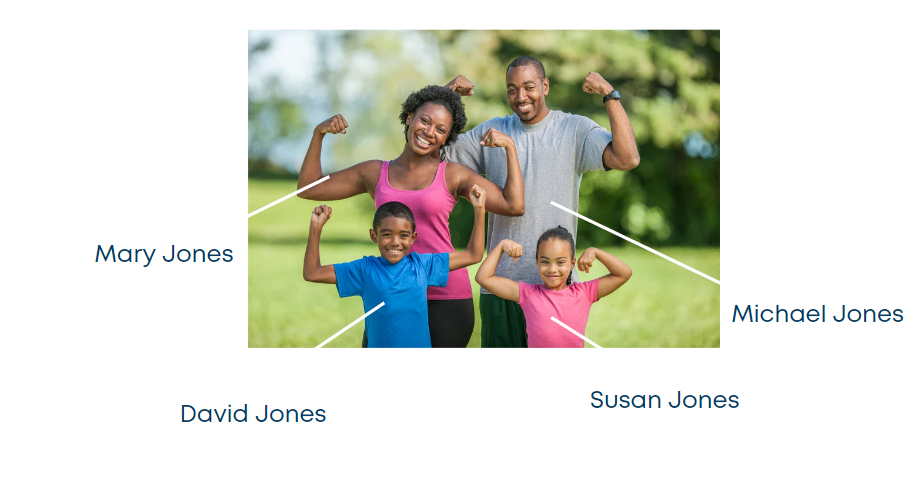
Here, we can see the household account of the “Jones family” with their family picture to personalize the experience for your customers.
This is how we used to keep the data in Excel files for the Jones family.
In the CRM the information is shown below:
**What is it?**
Screenshot from CRM for the Jones household.
**Why is it important?**
We can avoid navigating to multiple pages and instead provide a single snapshot of the Jones household, including the contact and other relevant information for them, including their birthday, etc.
Below, we are representing the data model of a family.
# Brown household (Example 2)
How does the Brown household look in the CRM?
### Why is it Important?
\
Here are some reasons why household roles play an essential role in a CRM system:
**Improved segmentation and targeting**
Household roles allow you to effectively segment your donor base to send more targeted and relevant communications. For example, you could send a different email to decision-makers than to influencers.
**Increased engagement**
When you understand the roles of the different members of a household, you can personalize your communications and engagement strategies accordingly. This can lead to increased engagement from all members of the household.
**More effective fundraising**
By understanding the decision-makers and influencers in each household, you can focus your fundraising efforts on the people who are most likely to give. This can lead to increased fundraising success.
**Improved volunteer management**
By understanding the roles of the different members of a household, you can recruit and manage volunteers more effectively. For example, you could recruit parents to volunteer at their children's school events.
**Better program delivery**
By understanding the roles of the different household members, you can tailor your programs and services to their needs. For example, you could offer a program for parents to learn how to support their children's education.
**Enhanced constituent relationships**
By understanding the roles of the different household members, you can build stronger relationships with your constituents. This can lead to increased loyalty and support.
Overall, household roles in a CRM system are a critical way to improve your donor relationships, increase your fundraising success, and better serve your community.
# Household Roles
How can we show the various family members' various relationships and roles?
Household roles in Salesforce Nonprofit Cloud are a way to categorize the different members of a household who may be involved with your nonprofit. This can include donors, volunteers, beneficiaries, and other stakeholders.
Some of the most common household roles include:
* **Decision Maker:** The person who makes the primary decisions about giving to and volunteering with your nonprofit.
* **Influencer:** Someone who influences the decision maker's giving and volunteering decisions.
* **Member:** A household member who may be involved with your nonprofit in some way but does not have a decision-making or influencing role.
* **Employee:** Someone who works for your nonprofit.
The data model below represents the roles of the individuals in the household account "Jones Family." Who is the decision maker, who is the influencer, etc.?
The relationships between the individual contacts are as follows:
* Micheal Jones is the husband of Mary Jones and the father of David Jones and Susan Jones.
* Mary Jones is the wife of Michael Jones and the mother of David Jones and Susan Jones.
* David Jones is the son of Michael Jones and Mary Jones and the brother of Susan Jones.
* Susan Jones is the daughter of Michael Jones and Mary Jones and the sister of David Jones.
You can also create custom household roles to fit your organization's specific needs. For example, you might want to create a role for "major donor," “recipient,” “parent,” "Volunteer,” “caregiver,” or "Board member."
# Why Households?
Where can I use the household accounts?
Household roles can be used for a variety of purposes, such as:
* Segmenting your donor base for fundraising campaigns
* Targeting your volunteer outreach efforts
* Identifying potential major donors
* Tracking the impact of your programs and services
# Relationships with Accounts
# Account Contact Relationship
We call it an Account Contact Relationship. The term "Account Contact Relationship" is commonly used in CRM systems to refer to the relationship between an individual contact and an organization. This relationship is often a link between the contact and account records in the CRM database.
This is how it looks in CRM .
# Account-Account Relationship
What are Account-Account Relationship?
## How does it look in CRM?
Here is an example of how an account account relationship could be used to track the relationship between the Jones household and the Brown household:
* The Jones household has an account in NPC Salesforce.
* The Brown household has an account in NPC Salesforce.
This would allow you to easily identify that the Jones household and the Brown household are neighbors. You could then use this information to target your fundraising efforts or to develop outreach programs.
# Relationship with Accounts
In Non-Profit Cloud (NPC) Salesforce, an account account relationship is a way to link two accounts together to represent a relationship between them. This can help track and manage relationships between organizations, such as parent organizations, subsidiaries, or partners.
In the case of the Jones household and Brown household, you could create an "Account-Account Relationship" between the two accounts to represent the fact that they are neighbors. This would allow you to quickly identify all of the accounts that are neighbors to the Jones household, and vice versa.
\
**Why is it important?**
Account account relationships are important because they can help you to:
* Track relationships between your organization and other organizations. This can help you to identify potential donors, partners, and volunteers.
* Understand the network of your organization and its stakeholders. This can help you to develop more effective strategies for fundraising, outreach, and engagement.
* Share information between related accounts. For example, you could share contact information between an individual donor's account and the account of the organization they donated to.
# Party Role Relationship
What is party-role relationship?
The Nonprofit Cloud defines relationships between individuals, organizations, and households using the Party Role Relationship object. Each party role relationship describes a connection between two entities, with a role and related role. For example, party role relationships can define the relationships between a grantmaker and grantee, program participant and sponsor, and spouses.
Party role relationships work by defining the specific roles that entities play within account account relationships and contact contact relationships. These roles provide context and clarity to these relationships, ensuring everyone understands their responsibilities.
\
Party role relationships are used on two different objects that connect records:
Account Account Relationships-AAR tracks relationships between business accounts, including households and other organizations.
In account-account relationships, party role relationships identify the specific roles that different accounts play in their interactions. In our example, the Jones Household and Brown Household are Neighbors.
## How does it look in CRM?
The Party Role Relationship for an “Account Account Relationship” name ends with AAR.
The List of sample party role relationships created for AAR
Likewise, in a business partnership, one account might be designated as the "Primary Partner" and the other as the "Secondary Partner." These roles clarify the responsibilities and expectations of each account within the partnership.
# Contact-Contact Relationships
How do you track relationships between two contacts?
In contact contact relationships, party role relationships define the specific roles different contacts play in their interactions.
In our example, Micheal Jones is the Spouse to Mary Jones.
## How does it look in CRM?
The Party Role Relationship for a “Contact Contact Relationship” name ends with CCR.
The List of sample party role relationships created for CCR.
Likewise, in a professional network, one contact might be designated as the "Mentor" and the other as the "Mentee." These roles provide context for the relationship and help establish clear expectations.
# Personalization
Personalization empowers you to create tailored interactions with your donors, volunteers, accounts, and contacts. By leveraging data-driven insights and leveraging powerful personalization features, you can build deeper connections and enhance engagement across your entire organization.
### How can I send personalized communications to the donors?
1. Personalized Email Campaigns: Create segmented email campaigns with personalized subject lines, body content, and call-to-actions tailored to each recipient's interests and preferences.
2. Dynamic Content: Use merge fields to insert personalized information, such as names, donation amounts, or volunteer hours, into your communications.
3. Personalized Account Dashboard: Tailor the account dashboard to display relevant information, such as upcoming events, custom reports, or personalized support resources, based on the account's needs.
\
**Why is it important?**
\
Increased donor loyalty and retention: Personalized communications can foster stronger relationships with donors, leading to increased giving and long-term support.
Enhanced volunteer engagement: Personalized outreach and recognition can motivate volunteers to stay involved and make a greater impact.
Improved account satisfaction: Tailored communication and support can strengthen relationships with key accounts, leading to increased business opportunities.
More effective contact interactions: Personalized messages and interactions can resonate better with individual contacts, driving higher engagement and conversion rates.
# Email Templates
How can I tailor communications to donors for a personalized touch?
A personalized touch can go a long way in making your donors feel appreciated. Address them by their first names, and acknowledge their specific contributions and the impact they've had on your mission. This small effort can make a big difference in strengthening your relationships.
Screenshot of an example email template for welcoming new donors
# Not using a CRM might loose you money
Running a nonprofit without a CRM system can have a significant financial impact.
When you don't have a CRM, your team ends up spending more time on administrative tasks, leaving less time for everything else. Imagine your sales team actively engaging with donors, attending meetings, and gathering valuable information. But too often, this information is stored in handwritten notes, individual laptops, or solely in the minds of your salespeople.
As a result, important details can get lost, follow-ups on meetings may be delayed, and prioritizing customers becomes a guessing game instead of an informed decision based on data. The situation worsens if a key salesperson leaves, taking their knowledge and contacts with them. However, the impact of lacking CRM is not limited to sales alone.
Your donors may reach out to you through various platforms such as phone, email, or social media, inquiring about orders, asking questions, or seeking assistance. Without a centralized platform for customer interactions, communication can easily get missed or lost in the influx of information, leading to delayed or unsatisfactory responses.
Even if you manage to collect all this data, making sense of it can be challenging. Extracting meaningful insights can be difficult, creating reports can be time-consuming, and these tasks can distract your team from their primary focus of fundraising and outreach. Managers may lose visibility into their teams' activities, resulting in insufficient support at critical moments. Moreover, without proper oversight, accountability within the team may suffer.
To overcome these challenges, a CRM system provides a solution. It serves as a centralized platform where you can track and manage donor interactions, streamline communication, and generate valuable insights. With a CRM, you can ensure that important information is not lost, promptly respond to donor inquiries, and gain a comprehensive understanding of your fundraising efforts. This enables you to make informed decisions, allocate resources effectively, and provide the necessary support to your team.
In summary, using a CRM system for your nonprofit helps you avoid financial setbacks. It eliminates administrative burdens, prevents missed opportunities, enhances communication, and facilitates data-driven decision-making. By implementing a CRM, you can improve efficiency, responsiveness, and accountability within your organization, ultimately driving success in your fundraising and donor relationships.
# Contact With a Single Relationship
How it looks in CRM?
# Fundraising
# Peer-to-peer
This approach involves encouraging your supporters to create personal fundraising pages or campaigns linked to your nonprofit. They can then share their stories, goals, and reasons for supporting your cause with their networks. This enables them to connect with their peers more personally and inspires them to contribute.
# Fundraising Pages
## Launch fundraising campaigns with customizable donation pages that are easy to build and use for donors.
1. **Customization at its best:** Customize your fundraising page with compelling imagery, videos, and stories about your organization to enhance the impact of your appeal.
2. **Real-time donation tracking**: Keep track of donations in nearly real-time with an on-page thermometer that can also be optimized for full-screen live display at your in-person and virtual events.
3. **Embedded video capabilities:** Easily share your livestreamed or recorded video broadcasts through popular services like YouTube, Vimeo, and Zoom, embedded directly on your fundraising page.
4. **Empower supporters:** Turn your donors into fundraisers with seamless individual and team peer-to-peer fundraising capabilities, empowering your supporters to raise funds on your behalf.
5. **Email fundraising made easy:** Include a link to your fundraising page in all of your emails and e-newsletters, especially in fundraising appeals, to make it convenient for supporters to donate.
6. **Social media campaigns:** Amplify your fundraising efforts by sharing your fundraising page on social media, and consider boosting your posts to reach new potential donors and expand your reach.
# Text to Donate
The easiest way to capture donations wherever a donor is inspired now with our five-digit shortcode to allow for easy Mobile Giving.
Text the word "KIND" to 44321 to donate to KindCause.org. If you would like to get started for your nonprofit, visit
# Event Ticketing
* [x] **In-person and virtual:** Make it easy to register for a gala, 5K race, conference, virtual fundraiser, volunteer day, and more.
* [x] **All types of tickets:** Sell tables, VIP tickets, complimentary/discounted entry, and more, with room for donations too.
* [x] **All info on one page:** Set up tickets, input important event information, and add optional videos and images.
* [x] **Embedded video:** Include your live-streamed or recorded video broadcast through services like YouTube, Vimeo, and Zoom.
### **Other features:**
* Unlimited event pages
* Spark interest in your event by adding video, images, text, and more
* Customizable tiers for tickets, tables, sponsorships, and advertising
* Custom ticket quantities, sale availability period, and pricing (including complimentary and discounted)
* Donations possible on top of or instead of ticket sales
* Ability to set a tax-deductible amount for each ticket price
* One-step ‘Add to Calendar’ button
* Automated, personalized thank-you emails for each ticket tier
* In-person location and directions set via Google Maps
* Built-in space for public or private virtual / live-streamed event links
* Optimized for Google Search
* Auto-synced and downloadable event attendee data
* Progress meters can track and exhibit donations in seconds on the Campaign Page and Live Display
# Live Display
Motivate donors to give at live events with a progress meter and real-time donation tracking to take your fundraising to the next level.
# Frictionless Fundraising
Source: Accenture Donor Survey 2022
Launch an online fundraising campaign in minutes that your donors can see on any device. Also allows for full customization.
The following show a sample screenshot of a portion of contact record on the KindX Platform.
Based on the needs of the organization, what you see can be customized.
# Recurring Donor
Micheal Jones is a donor who is donating on recurring basis.
# Case Management
Get a 360 degree view of your service tickets being raised. You can view the dashboards either by logging into the system, on your mobile, tablet or even emailed to yourself and others.
The dashboards can be customized to whatever view that is important to your nonprofit.
# Operations
Using Salesforce can significantly improve the operational efficiency of your nonprofit organization. Let me explain this in non-technical terms:
Salesforce is a powerful technology platform that can streamline your operations, enhance collaboration, and drive productivity across your organization.
Here are some key points to understand about how Salesforce can help improve operational efficiency:
1. **Centralized Data Management:** With Salesforce, you can consolidate all your important data into a single, centralized system. This includes donor information, volunteer details, program data, and more. Having all this data in one place eliminates the need for multiple spreadsheets or disconnected systems, making it easier to access and manage information.
2. **Streamlined Workflows:** Salesforce provides automation tools and customizable workflows that can automate repetitive tasks and streamline your processes. You can set up automated notifications, reminders, and approvals, reducing manual work and ensuring tasks are completed efficiently. This frees up time for your staff to focus on more strategic and impactful activities.
3. **Enhanced Communication and Collaboration:** Salesforce offers features for internal communication and collaboration, such as Chatter, which is similar to a social media platform for your organization. It allows your team members to communicate, share updates, collaborate on projects, and exchange information in real-time. This promotes seamless collaboration, improves team coordination, and accelerates decision-making.
4. **Integrated Fundraising and Donor Management:** Salesforce includes powerful fundraising and donor management capabilities. You can track donations, manage campaigns, and create personalized communication strategies within the same platform. Integrating fundraising and donor management allows for better insights into donor engagement, targeted outreach, and more effective fundraising strategies.
5. **Data-Driven Decision Making:** Salesforce provides robust reporting and analytics tools that enable data-driven decision making. You can generate customized reports, create dashboards, and visualize your data to gain valuable insights into your nonprofit's performance. These insights help you understand trends, measure outcomes, and make informed decisions to drive your organization's success.
6. **Scalability and Flexibility:** Salesforce is a scalable platform that can grow with your organization. Whether you're a small nonprofit or a large enterprise, Salesforce can accommodate your needs. You can customize the platform to fit your specific requirements, add new features as your organization evolves, and integrate with other systems to streamline processes.
# Automations
# Send Birthday emails
Automatically send birthday emails to donors and volunteers
**What does this automation do?**
This process operates on a daily schedule at 6:00 am, checking if it's the donors' birthdays and if they wish to be contacted by the non-profit organization.
**Why this automation is important?**
By automating the sending of birthday wishes and gratitude emails to donors, without the need for manual intervention, valuable time can be saved. Further, it helps create a more personalized relationships with the donors and volunteers of the nonprofit.
# Board
7 problems that can be solved by a CRM system for a nonprofit organization
1. **Donor Management**: Improve donor engagement and retention through better tracking and personalized communication.
2. **Fundraising Effectiveness**: Optimize fundraising campaigns by analyzing data to enhance performance.
3. **Volunteer Coordination**: Streamline volunteer management by matching skills and availability to organizational needs.
4. **Program Impact Tracking**: Demonstrate program impact to stakeholders and donors with data-driven insights.
5. **Member and Constituent Management**: Efficiently manage and engage members and constituents for increased involvement.
6. **Data Security and Compliance**: Ensure data security and compliance with relevant regulations to maintain trust.
7. **Efficiency and Productivity**: Automate tasks, reduce manual work, and improve overall organizational efficiency.
# Marketing
# Events
# Service and Case Management
# Donors
Check out the sections in the following tabs of how to stay connected, manage and engage with your donors.
# Donor management
Donor management is the process of effectively organizing, tracking, and nurturing relationships with your nonprofit's donors. It involves managing information about your donors, their contributions, and their engagement with your organization.
Think of donor management as a way to keep track of the people who support your nonprofit. It's like having a comprehensive address book or database that stores important information about your donors, such as their names, contact details, donation history, and any other relevant information.
Donor management helps you stay organized and maintain strong relationships with your supporters. It allows you to keep track of who has donated, how much they have given, and when they last contributed. This information helps you understand your donors' giving patterns, preferences, and level of engagement.
With donor management, you can personalize your interactions and communications with your donors. For example, you can send tailored thank-you notes, update them on the impact of their donations, or invite them to special events based on their interests. By knowing your donors better, you can provide a more personalized and meaningful experience, which can lead to stronger connections and increased support.
Additionally, donor management helps you identify potential major donors or supporters who may be capable of making larger contributions. By analyzing their giving history and engagement, you can prioritize your efforts and tailor your outreach to those who have the potential to make a significant impact on your organization.
Furthermore, donor management tools often include features like donation tracking, reporting, and communication management. These features help streamline your administrative tasks, generate reports on fundraising progress, and ensure that you stay in touch with your donors regularly.
In summary, donor management is about effectively organizing and maintaining relationships with your donors. By keeping track of their information, understanding their preferences, and personalizing your communications, you can build stronger connections, foster donor loyalty, and ultimately, increase support for your nonprofit's mission.
# Acquire donors
To acquire donors, there are three key strategies that can be effective for nonprofits: creating online donation pages, lead nurturing, and conversion.
1. **Create Online Donation Pages:** Establishing online donation pages provides a convenient and accessible way for individuals to contribute to your nonprofit's cause. These pages serve as a digital platform where potential donors can learn about your organization and easily make donations online. By designing user-friendly and visually appealing donation pages, you can inspire trust, convey your mission effectively, and make the donation process seamless for visitors.
2. **Lead Nurturing:** Lead nurturing involves building relationships with potential donors who have shown interest in your organization but have not yet made a donation. This is done through personalized communication and engagement strategies, such as sending targeted emails, sharing impact stories, or providing opportunities for involvement. The goal is to cultivate these leads by keeping them informed, building trust, and demonstrating the value of supporting your nonprofit. Over time, this nurturing process can convert interested individuals into committed donors.
3. **Conversion:** Conversion refers to the process of turning potential donors into actual donors. This involves strategically guiding individuals through the donation journey and encouraging them to take the final step of making a contribution. To optimize conversion rates, nonprofits employ persuasive techniques like clear calls-to-action, providing multiple donation options, and emphasizing the impact of their donations. Simplifying the donation process and ensuring a secure transaction experience are also crucial in boosting conversion rates.
By implementing these strategies, your nonprofit can effectively acquire donors and build a strong supporter base. Creating online donation pages makes it easy for individuals to contribute, while lead nurturing helps develop relationships with potential donors. The conversion process focuses on guiding interested individuals to complete their donations and become valued supporters of your organization. Remember, acquiring donors is an ongoing process that requires consistent effort, effective communication, and a compelling case for support.
# Donor 360
**A single view of the donor's profile means having all the important information about a donor in one place.** It's like having a comprehensive snapshot of the donor's details and interactions with your nonprofit. Here's an explanation in non-technical terms:
Imagine you have a folder that contains everything you need to know about a specific donor. This folder includes not only basic information like their name, contact details, and address but also additional details that help you understand them better.
In this single view of the donor's profile, you can see if there are other people in their household who are also connected to your nonprofit. This is important because it helps you understand the broader relationships within the donor's family or network, which can influence their involvement and support.
You can also track their interactions with your organization, such as attending events, volunteering, or participating in campaigns. This gives you insights into their level of engagement and helps you tailor your communication and engagement strategies accordingly.
Furthermore, the single view includes information about any ongoing cases or projects related to the donor. For example, if the donor has a specific goal or objective they want to support, you can document and track that information in their profile.
Additionally, you can keep notes and documents related to the donor within this view. These can include any important discussions, preferences, or specific instructions they have shared with your team. It helps ensure that everyone involved in engaging with the donor has access to the relevant information.
Activities and financial accounts are also part of the single view. You can track the donor's financial contributions, donations, and any relevant financial information. This provides a holistic picture of their financial support and helps you monitor their giving patterns.
Having all this information in one place makes it easier for your team to understand the donor's history, preferences, and engagement with your organization. It streamlines communication, ensures consistent interactions, and enables you to provide personalized experiences that resonate with the donor.
In summary, a single view of the donor's profile allows you to have a comprehensive understanding of the donor, including household connections, interactions, ongoing cases, goals, notes, documents, activities, and financial accounts. It helps you build stronger relationships, personalize your communication, and ultimately enhance the donor's experience with your nonprofit.
# Donor segmentation
Donor segmentation is the process of categorizing donors into distinct groups based on specific characteristics or behaviors. It helps nonprofit organizations better understand their donors and tailor their fundraising strategies to maximize donations. Here's an explanation in non-technical terms:
Imagine you have a list of people who support your nonprofit. Donor segmentation is like organizing them into different groups based on things they have in common. These commonalities could be their giving history, interests, demographics, or engagement with your organization.
Segmenting donors is important because it allows you to treat each group differently and communicate with them in a more personalized and targeted way. By understanding their unique needs, preferences, and motivations, you can create tailored messages and fundraising appeals that resonate with each group.
For example, let's say you have a group of donors who consistently give small donations, while another group contributes larger amounts. With donor segmentation, you can design specific fundraising campaigns for each group. You might focus on building relationships with the smaller donors, sending regular updates on how their contributions make a difference. For the larger donors, you could highlight the impact of their generosity and invite them to exclusive events or recognition programs.
Segmentation also helps you identify potential major donors or supporters who have the capacity to give more. By analyzing giving patterns and other relevant data, you can identify individuals who may be interested in supporting your organization at a higher level. This allows you to personalize your outreach efforts and build stronger relationships with those who have the potential to make a significant impact.
Ultimately, donor segmentation helps you build stronger connections with your supporters, enhance their experience, and increase the likelihood of receiving more donations. By understanding their unique characteristics and tailoring your fundraising strategies accordingly, you can cultivate long-lasting relationships and inspire greater support for your nonprofit's mission.
# "RFM" - donor segmentation
Recency, Frequency and Monetary amount ("RFM") of Donations
Donor segmentation is a strategic approach used by nonprofits to categorize donors based on three key factors: recency, frequency, and monetary amount of donations made.
1. **Recency:** Analyzing the recency of donations helps identify donors who have recently engaged with your organization. Donors who have made a donation more recently are often more responsive and likely to engage further. By segmenting donors based on recency, you can tailor specific communication strategies to nurture their ongoing support. For example, you might send timely updates or exclusive opportunities to this group to maintain their interest and involvement.
2. **Frequency:** Understanding the frequency at which donors contribute allows you to distinguish between occasional supporters and recurring donors. Donors who consistently contribute demonstrate a stronger commitment to your cause. By segmenting based on frequency, you can create targeted campaigns to acknowledge their loyalty, invite them to join membership programs, or offer incentives for their continued support. Building a relationship with these recurring donors can lead to sustained and reliable funding.
3. **Monetary:** Segmenting donors based on the monetary amount of their contributions helps identify potential major donors and allows for tailored stewardship. Individuals who consistently give larger amounts demonstrate their capacity and commitment to making a significant impact. By focusing on this segment, you can develop personalized cultivation strategies, such as inviting them to exclusive events, recognizing their generosity publicly, or involving them in high-level decision-making processes. Cultivating relationships with major donors can lead to transformative gifts that propel your nonprofit's mission forward.
In summary, donor segmentation based on recency, frequency, and amount of donations provides valuable insights to effectively engage with your supporters. By tailoring your communications, recognition, and cultivation efforts to each segment, you can foster stronger relationships, encourage ongoing engagement, and ultimately increase support for your nonprofit's mission.
# Donor engagement
# Personalization
In the world of nonprofit organizations, building strong relationships with donors is crucial for long-term success. One effective way to establish a personal connection is through personalized communication. Salesforce offers a range of powerful reporting features that can help you gather donor-specific information and leverage it to personalize your messages.
**Utilize Contact Reports:** Contact reports in Salesforce NPSP provide valuable information about individual donors. By generating customized Contact Reports, you can gather important details such as donor names, contact information, and past contributions. Here's how you can use these reports to personalize your communication:
* **Generate Contact Reports:** Create reports that include relevant fields such as donor names, contact details, donation amounts, and donation dates. This information will give you a comprehensive view of each donor's engagement with your organization.
* **Address donors by their names:** By having access to donor-specific information, you can address donors by their names in your communications. This personal touch demonstrates that you value their contributions and strengthens the bond between your organization and the donor.
**Leverage Campaign Member Reports:** Campaign Member Reports in NPSP allow you to identify donors associated with specific campaigns or initiatives. This feature enables targeted messaging and personalization based on their interests or involvement in a particular cause. Follow these steps to leverage Campaign Member Reports effectively:
* **Generate Campaign Member Reports:** Use the reporting capabilities of NPSP to identify donors who have participated in specific campaigns, events, or initiatives. These reports will provide insights into their engagement with your organization's various activities.
* **Tailor messages based on their interests:** Armed with the knowledge of donors' involvement in specific campaigns, you can personalize your messages to highlight their connection to the cause they supported. Whether it's thanking them for their contribution to a fundraising event or acknowledging their impact on a particular program, personalized messages demonstrate that you recognize and appreciate their dedication.
**Use Donation History Reports:** Donation History Reports provide insights into donors' giving history, allowing you to analyze their past contributions. This information can be leveraged to personalize messages and create a stronger connection. Here's how you can use Donation History Reports effectively:
* **Generate Donation History Reports:** Create reports that review donors' giving patterns, donation amounts, and donation dates. Analyzing this data will provide a comprehensive understanding of their past contributions.
* **Express gratitude and highlight impact:** Acknowledge donors' past contributions in your communications. Express your gratitude for their ongoing support and emphasize the impact their donations have made. By demonstrating the tangible difference their support has made, you strengthen their connection to your organization's mission.
Personalized communication plays a vital role in building stronger relationships with donors and reinforcing their connection to your organization's mission. Salesforce NPSP's suggested reports, including Contact Reports, Campaign Member Reports, and Donation History Reports, provide valuable insights that can be leveraged to personalize your messages effectively. By addressing donors by name, tailoring messages based on their interests, and expressing gratitude for their contributions, you create a meaningful and personalized experience for your donors. Take advantage of these reporting features in Salesforce NPSP to enhance your communication strategy and foster stronger relationships with your donors.
# Fundraising Pages
## Launch fundraising campaigns with customizable donation pages that are easy to build and use for donors.
1. **Customization at its best:** Customize your fundraising page with compelling imagery, videos, and stories about your organization to enhance the impact of your appeal.
2. **Real-time donation tracking**: Keep track of donations in nearly real-time with an on-page thermometer that can also be optimized for full-screen live display at your in-person and virtual events.
3. **Embedded video capabilities:** Easily share your livestreamed or recorded video broadcasts through popular services like YouTube, Vimeo, and Zoom, embedded directly on your fundraising page.
4. **Empower supporters:** Turn your donors into fundraisers with seamless individual and team peer-to-peer fundraising capabilities, empowering your supporters to raise funds on your behalf.
5. **Email fundraising made easy:** Include a link to your fundraising page in all of your emails and e-newsletters, especially in fundraising appeals, to make it convenient for supporters to donate.
6. **Social media campaigns:** Amplify your fundraising efforts by sharing your fundraising page on social media, and consider boosting your posts to reach new potential donors and expand your reach.
# Frictionless Fundraising
##
Source: Accenture Donor Survey 2022
The following show a sample screenshot of a portion of contact record on the KindX Platform.
Based on the needs of the organization, what you see can be customized.
# Event Ticketing
* [x] **In-person and virtual:** Make it easy to register for a gala, 5K race, conference, virtual fundraiser, volunteer day and more.
* [x] **All types of tickets:** Sell tables, VIP tickets, complimentary/discounted entry and more, with room for donations too.
* [x] **All info on one page:** Set up tickets, input important event information, then add optional video and images.
* [x] **Embedded video:** Include your livestreamed or recorded video broadcast through services like YouTube, Vimeo and Zoom.
### **Other features:**
* Unlimited event pages
* Spark interest in your event by adding video, images, text and more
* Customizable tiers for tickets, tables, sponsorships and advertising
* Custom ticket quantities, sale availability period and pricing (including complimentary and discounted)
* Donations possible on top of or in lieu of ticket sales
* Ability to set a tax-deductible amount for each ticket price
* One-step ‘Add to Calendar’ button
* Automated, personalized thank-you emails for each ticket tier
* In-person location and directions set via Google Maps
* Built-in space for public or private virtual / livestreamed event links
* Optimized for Google Search
* Auto-synced and downloadable event attendee data
* Progress meters can track and exhibit donations in seconds on Campaign Page and Live Display
# Program Management
Program management activities at a nonprofit can be efficiently handled using Salesforce.
Salesforce provides a comprehensive set of tools and features that can streamline your program management processes and enhance the overall effectiveness of your nonprofit's programs. Here's how Salesforce can support your nonprofit's program management activities:
1. **Centralized Program Data:** Salesforce allows you to centralize all your program-related information in one system. You can track and manage details such as program objectives, participants, activities, outcomes, and evaluations. Having all this information readily accessible in Salesforce helps you gain a holistic view of your programs and make data-driven decisions.
2. **Participant Tracking and Engagement:** Salesforce enables you to effectively track and engage with program participants. You can record participant details, track their progress, and capture relevant interactions. This allows you to have a comprehensive understanding of each participant's journey, tailor communications to their specific needs, and provide personalized support throughout the program.
3. **Task and Activity Management:** Salesforce helps you manage and track the tasks and activities associated with your programs. You can create and assign tasks to team members, set due dates, and monitor progress. This ensures that everyone involved in program implementation stays organized, knows their responsibilities, and can collaborate effectively to deliver successful outcomes.
4. **Communication and Collaboration:** Salesforce offers collaboration tools, such as Chatter, that facilitate seamless communication and collaboration among program team members. You can use Chatter to share updates, ask questions, and exchange information in real-time. This promotes effective teamwork, encourages knowledge sharing, and ensures that everyone is aligned and working towards program goals.
5. **Reporting and Evaluation:** Salesforce provides robust reporting and analytics capabilities that enable you to track program performance, measure outcomes, and evaluate the impact of your programs. You can generate custom reports and dashboards to monitor program progress, assess key metrics, and gain valuable insights. This data-driven approach helps you make informed decisions, identify areas for improvement, and showcase the success of your programs to stakeholders.
6. **Integration with Fundraising and Donor Management:** Salesforce integrates seamlessly with fundraising and donor management tools, allowing you to link program data with donor information. This integration helps you demonstrate the impact of your programs to donors, personalize communications based on program involvement, and strengthen donor relationships by showcasing how their contributions support specific programs.
In summary, Salesforce provides powerful tools for managing program management activities at your nonprofit. It centralizes program data, tracks participant engagement, manages tasks and activities, enables communication and collaboration, offers reporting and evaluation capabilities, and integrates with fundraising and donor management. By leveraging Salesforce, you can streamline your program management processes, enhance participant engagement, measure program impact, and ultimately achieve greater success in fulfilling your nonprofit's mission.
# Project Management
## Gantt Charts, Project Progress Reports and More
**Gantt Chart** helps you to visualize your project schedule, the relationships between tasks and project milestones.
When you open a project, Interface displays your project tasks on the left and the Gantt Chart. As you create project tasks, specify **Duration**, **Start** and **Finish Dates**, **Predecessors**, and **% Complete**, you will notice that Inspire Planner automatically plots the information on the Gantt Chart.
# Volunteer Management
Get a 360 degree view of how you are making use of the most important resource – your volunteers. You can view the dashboards either by logging into the system, on your mobile, tablet or even emailed
Benefits of using the dashboards to get a better understanding of the volunteers.
# Grant making
Grant-making activity at a nonprofit can be effectively managed using Salesforce.
Salesforce provides a comprehensive set of tools and features that can streamline your grant-making processes and enhance your overall efficiency. Here's how Salesforce can support your nonprofit's grant-making activities:
1. **Centralized Grant Management:** Salesforce allows you to consolidate all your grant-related information in one central system. You can track and manage details such as grant applications, funding opportunities, reporting requirements, and payment schedules. Having all this information readily accessible in Salesforce helps you stay organized and effectively manage your grants.
2. **Automated Workflows:** Salesforce enables you to create customized workflows and automate various grant-related processes. For example, you can set up automated notifications for upcoming grant deadlines, automate application reviews, and generate reminders for reporting requirements. These automated workflows reduce manual effort, ensure timely actions, and improve overall productivity.
3. **Document and File Management:** With Salesforce, you can securely store and manage all grant-related documents and files. This includes application materials, funding agreements, progress reports, and any other supporting documentation. Having a centralized repository for these files ensures easy access, version control, and collaboration among team members involved in the grant-making process.
4. **Collaboration and Communication:** Salesforce offers collaboration tools, such as Chatter, that enable seamless communication and collaboration among team members involved in grant-making activities. You can use Chatter to discuss grant applications, share updates, assign tasks, and exchange information in real-time. This fosters effective teamwork and ensures everyone is on the same page.
5. **Grant Performance Tracking:** Salesforce allows you to track the performance and impact of your grants. You can set up metrics and key performance indicators (KPIs) to monitor the outcomes and progress of funded projects. This data-driven approach helps you assess the effectiveness of your grants, make data-backed decisions, and demonstrate the impact of your grant-making activities to stakeholders.
6. **Reporting and Analytics:** Salesforce provides robust reporting and analytics capabilities that enable you to generate meaningful reports and gain insights into your grant-making initiatives. You can create custom reports to track grant distribution, analyze funding trends, and evaluate the success of your grant programs. These insights help you make informed decisions, identify areas for improvement, and showcase the impact of your grant-making efforts.
In summary, Salesforce is a powerful tool for managing grant-making activities at your nonprofit. It centralizes grant-related information, automates workflows, facilitates collaboration and communication, tracks grant performance, and offers reporting and analytics capabilities. By leveraging Salesforce, you can streamline your grant-making processes, enhance efficiency, and make a greater impact in the communities you serve.
# Finance and Accounting
Reconciling revenue (gift records) and expenditure with your Finance team and Finance systems is an important process for your nonprofit organization.
Reconciliation is the act of ensuring that the financial records in your organization align accurately with the records maintained by your Finance team and Finance systems. Specifically, it involves matching the revenue or gift records you have recorded with the income reported by your Finance team and making sure that your expenditure aligns with the expenses recorded by the Finance team.
Here's why reconciliation with your Finance team and Finance systems is important:
1. **Accuracy and Integrity:** Reconciliation helps ensure the accuracy and integrity of your financial data. By comparing your revenue and expenditure records with the Finance team's records, you can identify any discrepancies or errors that may have occurred. This ensures that your financial information is reliable and trustworthy, which is crucial for decision-making, reporting, and compliance purposes.
2. **Financial Accountability:** Reconciliation promotes financial accountability within your nonprofit. It helps you identify any discrepancies or inconsistencies in revenue and expenditure, enabling you to investigate and resolve any issues promptly. This accountability is important for maintaining transparency, complying with financial regulations, and building trust with stakeholders such as donors, funders, and regulatory authorities.
3. **Financial Controls:** Reconciliation serves as an essential control mechanism for your organization's financial operations. By regularly reconciling your records with the Finance team's records, you can detect any unauthorized transactions, errors, or potential fraud. This control helps safeguard your financial resources, prevent financial mismanagement, and maintain the financial health of your nonprofit.
4. **Accurate Reporting:** Reconciliation ensures that your financial reports provide an accurate picture of your nonprofit's financial position. By reconciling revenue and expenditure, you can confidently generate financial statements and reports that reflect the true financial performance of your organization. This accuracy is vital for compliance with regulatory requirements and for providing clear and transparent financial information to stakeholders.
To facilitate the reconciliation process, it is beneficial to use a technology solution, such as Salesforce, that integrates with your Finance systems. Salesforce can help streamline the reconciliation process by providing a centralized platform for recording revenue and expenditure data, generating reports, and sharing information with the Finance team. This integration improves efficiency, reduces manual errors, and promotes better collaboration between your fundraising and finance teams.
In summary, reconciling revenue and expenditure with your Finance team and Finance systems ensures accuracy, financial accountability, strong financial controls, and accurate reporting for your nonprofit. By implementing effective reconciliation practices and leveraging technology solutions like Salesforce, you can maintain financial integrity, comply with regulations, and foster trust among stakeholders.
# Grants - Inbound
# Grants - Outbound
# Outcome Management
# AI / GPT
Unlock the Power and Accessibility of Artificial Intelligence (AI) for All Organizations
In today's technological landscape, AI has become more accessible and powerful than ever before. From nonprofits to Fortune 100 companies across industries, every organization can reap the benefits of AI right now.
Nonprofits can harness the potential of AI, including generative AI. By leveraging AI, nonprofits can automate repetitive processes, enhance efficiency, gain rapid insights, and decipher complex patterns. With AI's support in decision-making, speed, and operational efficiency, think creatively, and drive innovative breakthroughs.
# GPT
GPT stands for "Generative Pre-trained Transformer."
**GPT stands for "Generative Pre-trained Transformer."** It refers to a type of advanced artificial intelligence (AI) technology developed by OpenAI. GPT is designed to understand and generate human-like text based on the input it receives.
Imagine GPT as a sophisticated language model that has been trained on a vast amount of text data from books, articles, websites, and more. This training allows GPT to learn patterns, language structures, and even the context of different sentences. As a result, GPT can generate coherent and contextually relevant responses when provided with a prompt or question.
GPT is widely used for various applications, including natural language understanding, language translation, content generation, and even assisting with customer service interactions. Its capabilities are continually being improved and refined to provide more accurate and human-like responses.
It's important to note that while GPT is a powerful AI tool, it has limitations. It relies on the training data it has been provided, which means it may not always have access to the most up-to-date information. Additionally, GPT does not possess true understanding or consciousness like humans do. Therefore, it's essential to use GPT-generated information with caution, verify its accuracy when necessary, and exercise critical thinking and human judgment in evaluating the responses it provides.
In summary, GPT is an advanced AI technology that can understand and generate human-like text. It has been trained on vast amounts of data to provide coherent responses based on the input it receives. While GPT can be a valuable tool, it's important to approach its outputs with critical thinking and human judgment.
# GPT - Terminology
Below is some common terminology related to Chat GPT or "Generative Pre-trained Transformer" Here are a few terms and their explanations in non-technical language:
1. **Chat GPT:** Chat GPT refers to a language model developed by OpenAI called "Generative Pre-trained Transformer." It's a sophisticated artificial intelligence system that can understand and generate human-like text responses based on the input it receives.
2. **Language Model:** A language model is a program or system that understands and generates human language. In the case of Chat GPT, it has been trained on vast amounts of text data and can generate coherent responses based on the input it receives.
3. **AI (Artificial Intelligence):** AI is a field of computer science that aims to create intelligent machines capable of performing tasks that typically require human intelligence. Chat GPT is an example of AI technology as it uses advanced algorithms to process and generate human-like text.
4. **Natural Language Processing (NLP):** NLP refers to the branch of AI that focuses on enabling computers to understand, interpret, and generate human language. Chat GPT utilizes NLP techniques to comprehend and respond to text-based inputs.
5. **Training Data:** Training data is the information used to train an AI model like Chat GPT. It consists of large amounts of text from various sources such as books, articles, and websites. The model learns patterns and structures from this data to generate coherent responses.
6. **Prompt:** A prompt is the input or question provided to Chat GPT to generate a response. The quality and specificity of the prompt can influence the output of the model.
7. **Fine-tuning:** Fine-tuning is the process of further training a pre-existing AI model on specific data to adapt it for a particular task or domain. This process helps improve the model's performance and relevance to specific use cases.
Remember, while Chat GPT can provide valuable information and responses, it's important to critically evaluate the information and exercise human judgment. Chat GPT is a powerful tool, but it's still an AI system and may not always provide perfect or contextually accurate responses.
# Generative meaning
The word "**generative**" refers to the ability to create or produce something. In the context of artificial intelligence (AI), generative models, such as Generative Pre-trained Transformers (GPT), are designed to generate new content, such as text, images, or even music, based on patterns and examples from existing data. These models learn the underlying structure and characteristics of the training data and use that knowledge to generate new, original content.
In the case of text generation, a generative model like GPT can analyze a large amount of text data and learn the patterns, context, and grammar of the language. It can then generate coherent and contextually relevant text based on the patterns it has learned. The generative aspect allows the model to produce novel and creative outputs that resemble human-generated content.
The term "generative" in the context of AI signifies the model's capability to go beyond simply analyzing and understanding existing data. It empowers the model to create new content or responses that are original and can mimic human-like behavior. This ability to generate new content is a key feature of generative models in AI and has opened up possibilities for various applications such as language generation, creative content creation, and more.
# Chat GPT - use cases
Below are some examples of potential use cases of using Chat GPT within Salesforce.
1. **Customer Support:** With Chat GPT integrated into Salesforce, you can enhance your customer support by providing an **AI-powered chatbot**. This chatbot can interact with website visitors or donors, answer frequently asked questions, provide information about your nonprofit's programs and services, and offer assistance in a timely manner. It can help improve response times and provide consistent support round-the-clock.
2. **Donor Engagement:** Chat GPT can be used to engage donors in personalized conversations. By analyzing donor data stored in Salesforce, Chat GPT can generate tailored messages, send personalized donation appeals, and provide updates on the impact of their contributions. This personalized engagement can strengthen relationships with donors and encourage continued support.
3. **Volunteer Management:** Chat GPT can streamline volunteer management processes by automating tasks such as volunteer registration, scheduling, and communication. It can provide volunteers with information about upcoming opportunities, answer their queries, and send reminders and notifications. This can help your nonprofit efficiently manage and engage volunteers, saving time and effort.
4. **Event Registration and Assistance:** Chat GPT can be leveraged to handle event registrations, provide event information, and address inquiries from attendees. It can automate the event registration process, collect attendee data, and send confirmations and event reminders. During the event, it can assist with directions, provide updates, and answer questions, enhancing the attendee experience.
5. **Program Information and Resource Access:** Chat GPT can serve as a knowledge base, offering instant access to program information, resources, and documentation. Users can interact with the chatbot to find answers to their questions, access training materials, and obtain relevant resources. This self-service capability can empower stakeholders to find information quickly and easily.
These are just a few examples of how Chat GPT can be utilized within Salesforce for different nonprofit use cases. The versatility of Chat GPT allows for its application in various areas of your nonprofit's operations, helping streamline processes, improve engagement, and enhance overall efficiency.
Remember, integrating Chat GPT into Salesforce requires careful planning, customization, and ongoing monitoring to ensure its effectiveness and alignment with your corporate goals.
# GPT - Privacy
You may have concerns about the data used to train Chat GPT and its impact on the safety of your nonprofit's data. Let me address these concerns:
Chat GPT's training data consists of a vast collection of publicly available text from books, articles, websites, and other sources. This training data does not include specific or proprietary information from any individual or organization, including your nonprofit's data. Therefore, Chat GPT does not make direct use of your nonprofit's data to train the model.
When it comes to data safety, it's important to note that the primary function of Chat GPT is to generate responses based on the information it has been trained on. **It does not retain or store any personal or sensitive data shared during conversations. The data you provide while interacting with Chat GPT is not stored or used beyond the immediate conversation.** OpenAI, the organization behind Chat GPT, prioritizes user privacy and takes measures to ensure the confidentiality of user interactions.
It's worth mentioning that as with any technology, it's crucial to follow best practices for data security within your organization. This includes implementing appropriate security measures to protect your nonprofit's data, controlling access to sensitive information, and adhering to applicable data protection regulations.
OpenAI is committed to responsible AI usage and continually works to improve the safety and privacy aspects of its models. They employ measures to minimize biases and ensure the ethical use of AI technology.
In summary, Chat GPT does not use your nonprofit's data to train the model, and the conversations you have with Chat GPT do not pose a risk to the safety of your nonprofit's data. However, it's essential to implement data security practices within your organization to safeguard your nonprofit's data. By following best practices and being mindful of data security, you can confidently leverage the benefits of Chat GPT while protecting your nonprofit's data.
# Using AI
Putting the AI tools to work at nonprofit
At KindX, we are revolutionizing the way nonprofits work, create, connect, and grow by harnessing the immense potential of generative AI. Through our innovative approach, we are unlocking new possibilities and opportunities for individuals and organizations alike. Connect with us to discuss and to explore what's next and discover the limitless potential of generative AI.
# Photoshop Generative Fill
### Check out the future of editing photographs!
{% embed url="" %}
# Generative AI and creative arms race
Ovetta Patrice Sampson (Config 2023)
{% embed url="" %}
There's a new sheriff in creative land and its name is Generative AI. Now that machines can talk to us and each other, can replicate just about anything we can do with text, imagery and art does that mean the age of Human Design is over? Well, Skynet not yet. Learn how this technology revolution can help humans to be more creative, innovative and imaginative if we just keep calm and human on.
# Dashboards & KPI's
#### Obtain a 360-degree view of your donors on a monthly basis. You can view dashboards by logging into the system, using your mobile or tablet, or even by receiving them via email.
The dashboards can be customized to whatever view that is important to your nonprofit to see the performance of your nonprofit by month. The advantage is that we can keep the Board informed of the current activities even though they do not meet on a monthly basis, to increase the transparency in the organization.
As an executive at a nonprofit organization, you may want to see dashboards that provide you with relevant and actionable insights to help you make informed decisions and effectively manage your nonprofit's operations.
The specific dashboards you need would depend on your nonprofit's goals, priorities, and reporting requirements. Customizing your dashboards in your nonprofit's unique needs and objectives can provide you with meaningful insights and help you make informed decisions to drive your nonprofit's success.
# CEO's Ops Dashboard
Dashboard of how are we are currently doing
{% hint style="info" %}
**Dashboard below uses power of data visualization to show the sources of donations:**
* **Gain deep insights into donation sources throughout the year, providing a comprehensive understanding of donation inflows. It's like sitting in a cockpit, where all the key metrics are readily available.**
* **Begin by exploring the first component, showcasing total donations by year, enabling you to track and analyze year-to-year comparisons effortlessly.**
* **Easily examine donation data categorized by donor type, distinguishing between households and corporate accounts, for a detailed overview of contribution patterns.**
{% endhint %}
### **Below, we present a breakdown of the specific components featured in the above dashboard:**
### **1. Donations This Year:**
**What it measures:** This component showcases the aggregate donor amount received of $197K for the present fiscal year through a gauge chart, accompanied by a predefined annual goal of $400K.
**Why it’s important:** By visually representing the total donor amount for the current fiscal year in relation to the set yearly goal, It plays a crucial role by providing valuable insights that enable informed decision-making and effective monitoring of the organization's financial progress, facilitating timely adjustments and strategic planning as necessary.
### **2.** Donation Amount Fiscal Year Comparison**:**
**What it measures:** The "Donation Amount Fiscal Year Comparison" component displays and compares the donation amount per fiscal year. In the above we can see the comparison for the fiscal years 2016 to 2023.
**Why it’s important:** This component enables organizations to analyze donation trends across fiscal years, optimize fundraising strategies, set realistic goals, and ensure sustainable fundraising success through data-driven decision-making.
### 3. Donations Received by Donation Type
**What it measures:** The "Donations Received by Donation Type" component displays the distribution of donations across various types or categories.
**Why it’s important:** Understanding donation patterns and prioritizing successful donation types are crucial for optimizing fundraising strategies and maximizing their effectiveness. This information enables organizations to make informed decisions, allocate resources wisely, and engage donors strategically to achieve their fundraising goals.
### 4. Donations by Donor Households or Organizations
**What it measures:** The "Donations by Donor Households or Organizations" component provides insights into the distribution of donations from households and organizations.
**Why it’s important:** Understanding the distribution of donations between households and organizations is important for tailoring fundraising strategies and effectively engaging different donor segments. By analyzing these patterns, organizations can allocate resources and customize their approaches to optimize fundraising outcomes and cultivate stronger relationships with donors.
### 5. Donation Stages
**What it measures:** The "Donation Stages" component provides visibility into the various stages of the donation process.
**Why it’s important:** This component allows organizations to effectively manage and track the progress of donations through different stages. By having visibility into donation stages, organizations can identify potential bottlenecks or areas of improvement, streamline processes, and ensure timely follow-up or engagement with donors. This helps maintain transparency, improve efficiency, and maximize the effectiveness of the overall donation management process.
### 6. Potential Donations by Stage
**What it measures:** The "Potential Donations by Stage" component displays ongoing donations that have not been closed yet.
**Why it’s important:** This component enables organizations to track and manage ongoing donation opportunities that have not been closed yet. By having visibility into potential donations at different stages, organizations can prioritize follow-up actions, ensure timely engagement, and maximize their fundraising success.
### 7. Top 10 Donations Currently Open
**What it measures:** The "Top 10 Donations Currently Open" component highlights the highest-value donations that are currently in progress and have not yet been closed.
**Why it’s important:** This component helps organizations prioritize high-value donations in progress, allocate resources effectively, and increase the likelihood of successful closure. It maximizes fundraising outcomes, generates significant revenue, and advances organizational goals.
Ref.: #D1.02
# CEO's Time Machine Dashboard
The data in the dashboard changes based on time period selected from my customized dropdown list
{% hint style="info" %}
**Dashboard below uses power of data visualization to show the sources of donations:**
* **We can do this by adding a filter on the dashboard of key metrics for the nonprofit that provides the user the ability to change between the following time periods:**
* Current Year (All),
* Last Fiscal Quarter,
* Last Fiscal Year,
* Last Month, and
* Last 3 Fiscal Years, etc.
**Note: The above time periods are customizable based on the specific needs of the user.**
{% endhint %}
Below, we present a breakdown of the specific components featured in the above dashboard:
### **1. The Filter Selector allows users to choose between predefined date ranges through filters.**
With a single click we can see multiple options for the various time periods that can be selected.
### **2.** Current Year ("CY") Donations**:**
**What it measures:** This component provides a quick and easy overview of the donation amount for the present year, serving as a baseline to assess fundraising performance at a glance. This component shows the current year ("CY") donations are a total of $197k.
**Why it’s important:** Current year donations are important because they reflect the nonprofit’s fundraising progress and financial performance. Tracking these donations helps nonprofits measure their success and make informed decisions.
### **3.** Donor Count**:**
**What it measures:** This component offers a simple and convenient summary of the number of donors, providing an at-a-glance overview of donor participation. At a quick glance, we can see that the number of donors this year is 59 donors.
**Why it’s important:** Donor count is important because it indicates the level of support and engagement from the people who matter the most, your donor base. It helps measure the nonprofit's donor base and assess its potential for fundraising success.
### **4.** Donation %age Change**:**
**What it measures:** This component displays the percentage difference in donations, indicating the growth or decline compared to a previous period. In the above chart, it shows that the current year (”CY”) donations were higher by 126.7% compared to the prior year (”PY”).
**Why it’s important:** The percentage change in donations provides valuable information as it indicates the growth or decline in fundraising efforts. This information helps with understanding the effectiveness of the nonprofit’s strategies, along with identifying areas of improvement and making data-driven decisions to drive towards financial and overall success.
### **5.** Donations Given By Household**:**
**What it measures:** This component displays a chart of total donation amounts by household, sorted from highest to lowest, providing insights into the distribution of contributions.
**Why it’s important:** Understanding household donations is important for nonprofits as it enables them to identify key supporters, cultivate long-term relationships, and personalize fundraising efforts based on individual donor preferences and giving capacities.
### **6.** Corporate Donors**:**
**What it measures:** This component provides a list view of corporate donors sorted by amount highest to lowest.
**Why it’s important:** Having a list of corporate donors is important for nonprofits as it allows recognition and appreciation of the companies that have shown support through donations, fostering positive relationships and potential avenues for future collaboration. Additionally, understanding corporate donor trends and preferences helps nonprofits tailor their fundraising strategies to attract and engage other businesses in their cause.
### **7.** Donors By Range**:**
**What it measures:** This displays the count of donors sorted into donation giving ranges. From the chart, we have 206 donors which are separated by donation giving ranges. In this example, we categorized donations by range, <$50, $50-$100, $101 - $500, $501 - $1000, +$1000.
**Why it’s important:** Knowing the distribution of donors based on donation amount ranges is important as it provides nonprofits with valuable insights into the varying degrees of backing received from donors.
### **8.** Total Number of Donors Year To Date (YTD)**:**
**What it measures:** This component shows the count of donors based on their donation type. The example displays a YTD total number of donors (1471) to the nonprofit then further categorized by donation type, for this example:
* Dollar donation,
* In-kind gift
* Memberships
* Other
Note: These values can be tailored to your nonprofit needs.
**Why it’s important:** Knowing the total number of donors by donor type is important for nonprofits to understand the donor base composition and tailor effective engagement strategies. This information enables optimization of fundraising efforts and evaluation of outreach effectiveness for different donor types.
### **9. Total** Donation by Type YTD**:**
**What it measures:** This component displays a chart that represents the total donation amount categorized by donor type. The example displays a total amount of donations ($1.5m), then displays the distribution by donation type.
**Why it’s important:** This component is important as it helps organizations understand the distribution of donations across different donor types. This information helps nonprofits understand donation distribution among donor types, enabling them to optimize fundraising strategies and personalize engagement strategies for varied donor groups.
*Ref: D2.01\_Exec Donor Dashboard w/ Filters*
# Driving Success Dashboard
Driving Success: Tracking Targets, Engaging Contributors, and Amplifying Donations for our Nonprofit.
{% hint style="info" %}
**The dashboard begins by showcasing the nonprofit’s overall goals, followed by a section displaying LYBUNT (Last Year But Not This) and SYBUNT (Some Year But Not This) donors per households and organization. These are presented alongside a list of previous donors for the team to follow up on. Additionally, the dashboard includes information on overdue accounts and donations that are currently open in the donation phase.**
{% endhint %}
Below, we present a breakdown of the specific components featured in the above dashboard:
### **1.** Fundraising Goal
**What it measures:** This shows my nonprofit's progress towards its current year's fundraising target, similar to the speedometer in the car. In the above, we can see that we have achieved $197K or 66% of the total donation goal of $300K for the year.
**Why it’s important:** This shows how close my nonprofit is to reaching its fundraising goal for the year. It helps the organization see if they're doing well or if we need to make changes to their fundraising plans.With a single click we can see multiple options for the various time periods that can be selected.
### **2.** New Donors Goal
**What it measures:** The "New Donors Goal" chart showcases the organization's current progress in acquiring new donors for the year, visually showing the number of new supporters for the nonprofit. For example, the nonprofit gained four new supporters this year which represents 10% progress towards the yearly goal of 40 new donors.
**Why it’s important:** Tracking these new donors provides insights into the effectiveness of donor acquisition strategies, allowing the organization to optimize efforts and expand its donor base.
### **3.** **Last Year But Unfortunately Not This Year (or "**LYBUNT") Households**:**
**What it measures:** "LYBUNT Households" displays the number of household accounts who have donated **Last Year But Unfortunately Not This Year**. This metric is showing that there were five households who donated last year, but not this year.
**Why it’s important:** Understanding the count of LYBUNT households is important as it helps the nonprofit identify how many donors who have previously supported to the nonprofit last year but have not made any donations in the current year. The fund manager can use this information to create targeted campaigns for these five households and re-engage with these donors in order to increase the donations for the nonprofit.
### **4. Some Years But Unfortunately Not This Year (or "**SYBUNT") Households**:**
**What it measures:** "SYBUNT Households" displays the number of household accounts who have donated **Some Years But Unfortunately Not This Year**. This component is showing that there are 192 previous donors who have donated previously in the past, but not this year.
**Why it’s important:** Understanding the count of SYBUNT households is important as it helps nonprofits identify a specific group of donors who have made contributions the past, but not in the current year. This information allows the nonprofit to tailor its outreach and engagement strategies to reconnect with these donors to potentially regain their support, thus maximizing donor retention and overall fundraising effectiveness.
### **5.** LYBUNT Organizations**:**
**What it measures:** This component displays the number of companies who have donated Last Year But Unfortunately Not This Year. In this component, there are zero companies that have donated last year but not this year, which indicates that all previous donors have indeed continued their donations this year with the nonprofit.
**Why it’s important:** Understanding the count of LYBUNT organizations is important as it helps the nonprofit identify a specific group of donors who have previously supported last year, but have not made any contributions for the current year. This information enables the nonprofit to create targeted campaigns for follow-up and re-engagement efforts to potentially regain the support of these companies, increasing donor retention rates.
### **6.** SYBUNT Org
**What it measures:** This component displays the number of companies who have donated Some Years But Unfortunately Not This Year. In the component, we see there are six companies who have contributed in the past, but not this year.
**Why it’s important:** Understanding the count of SYBUNT Org is important as it helps the nonprofit identify a specific group of donors who have made contributions in the past but not in the current year. With this information, the nonprofit can tailor outreach and engagement strategies to reconnect with these companies who previously have donated and potentially regain their support in order to maximizing organizational donor retention and overall fundraising effectiveness.
### **7.** Donors By Range**:**
**What it measures:** This Donor List shows donors who have not contributed this year. It shows the donor’s name, contact name, donation total, donation average, and last year's donation amounts.
**Why it’s important:** This list helps organizations identify specific donors who have not contributed in the current year. Fund Managers can then create targeted efforts to re-engage with these donors and foster stronger relationships to potentially increase future donations.
### **8.** Overdue Accounts
**What it measures:** This component presents a chart with account names and the corresponding amounts for those who require follow-up due to outstanding payments. In this chart, it shows the Chen Household has an outstanding payment of $11k.
**Why it’s important:** This chart helps nonprofits identify and prioritize donor’s accounts that need attention to ensure timely payment collection.
### **9.** Path of Open Donations by Phase
**What it measures:** This chart illustrates a funnel that represents the progression of open donations through various phases or stages of the donation process, indicating the dollar amount associated with each step. The funnel begins at the top with the initial phases and progresses downwards towards the final stages just before the donation is completed, with the dollar amount reflecting the value at each stage in the sequence. As you can see, $7.1k is very close to closing.
**Why it’s important:** This provides the nonprofit with a clear understanding of the status and progression of open donations. By visualizing the donation journey and identifying any potential obstacles, the nonprofit can take proactive measures to optimize their fundraising strategies and ensure the successful completion of donations.
*Ref: D3.01\_Fundraising Manager Dashboard CY*
# Donor Dashboards
## Why?
Get a 360 degree view of your donors. You can view the dashboards either by logging into the system, on your mobile, tablet or even emailed to yourself and others.
The dashboards can be customized to whatever view that is important to your nonprofit.
# Giving Range This Year
The **Giving Range This Year** component displays the total gift amounts from all donors categorized by donation amount ranges, including $0-$100, $100-$1000, $1000-$10000, and +$10000. Notably, it reveals that there have been significant large donations of more than $10000, amounting to $127k.
**Why it's important:** This component holds importance as it provides a high-level view of the donations received in the current year and offers insights into the size of those donations. It allows nonprofits to gauge the overall donation trends and understand the distribution of donation amounts within different ranges. This information is valuable for assessing fundraising performance, setting fundraising goals, and making informed decisions regarding resource allocation and strategy adjustments. By having visibility into the size of donations coming in, nonprofits can effectively plan and adapt their fundraising strategies to maximize their impact and achieve their fundraising objectives.
# Household Gifts This Year
The **Household Gifts This Year** component displays a list of donor households and the total amount they have donated in the current year. For instance, it showcases that the "John Nhoj Household" has made a generous donation of $30k this year.
**Why it's important:** This component is crucial for nonprofits as it provides insights into their strongest supporters and top donor households. By knowing which donors and households have contributed the most, nonprofits can identify their most valuable supporters and cultivate stronger relationships with them. This knowledge allows organizations to personalize their stewardship efforts, express gratitude, and provide tailored engagement opportunities to their top supporters. Understanding the generosity and commitment of these households helps nonprofits prioritize donor outreach, focus on retention strategies, and potentially seek additional support or major gifts. Ultimately, the Household Gifts This Year component allows nonprofits to effectively recognize and nurture their strongest supporters, fostering long-term donor loyalty and maximizing their fundraising success.
# Campaign ROI Analysis
The **Campaign ROI Analysis** component showcases campaigns listed by date along with their corresponding costs. It provides a clear overview of the campaigns conducted and the associated expenses incurred.
**Why it's important:** This component is essential for nonprofits as it enables them to effectively track and monitor their campaigns. By organizing campaigns by date and displaying the costs incurred, nonprofits can accurately assess the financial impact of each initiative. Tracking campaign costs allows organizations to understand the investment required for each campaign and evaluate the return on investment (ROI). This information helps nonprofits make informed decisions about resource allocation, prioritize campaigns based on their cost-effectiveness, and optimize their overall fundraising strategies. By keeping track of campaigns and their actual costs, nonprofits can gain insights into the financial performance of their fundraising efforts, make data-driven decisions, and ensure efficient use of resources.
# Revenue Trend over Years
The **Revenue Trend over Years** component showcases a bar graph illustrating the revenue generated per year for the past eight years. It allows nonprofits to compare and analyze the revenue trends over time, providing insights into the organization's financial performance.
**Why it's important:** This component holds significance as it enables nonprofits to track and compare revenue from the current year with previous years. By visualizing revenue trends, organizations can identify patterns, growth trajectories, and fluctuations in their financial performance. This information helps nonprofits assess their progress, set realistic goals, and make informed decisions about budgeting, resource allocation, and fundraising strategies. It also provides a historical context for evaluating the impact of various initiatives and external factors on revenue generation. Having the ability to compare revenue across multiple years allows nonprofits to identify areas of strength, address potential challenges, and develop strategies to sustain and enhance their financial sustainability.
# Opportunity Pipeline-Stage
The **Opportunity Pipeline by Stage** report provides a visual representation of the donation flow categorized by donor type and donation type at various stages. It helps nonprofits track the progress of potential donations, identify bottlenecks, and optimize their fundraising efforts.
**Why it's important:** This report is crucial as it enables organizations to strategically manage their fundraising pipeline. By visualizing the donation flow, nonprofits can allocate resources effectively, prioritize outreach activities, and enhance conversion rates. It provides valuable insights into the effectiveness of fundraising strategies, allowing organizations to refine their approaches, increase efficiency, and maximize their fundraising success. Ultimately, the Opportunity Pipeline by Stage report empowers nonprofits to make data-driven decisions and drive their fundraising initiatives forward.
# Organization Gifts This Year
The **Organization Gifts This Year** component is a bar chart that displays the total amount of donations given by organizations or companies in the current year, sorted by the highest donor.
**Why it's important:** This component is vital for nonprofits as it provides a clear visual representation of the support received from organizational donors. By quickly assessing the bar chart, nonprofits can identify the highest contributing organizations or companies. This information helps organizations prioritize their engagement efforts, recognize and cultivate strong relationships with top organizational donors, and strategically leverage corporate support. Monitoring the bar chart allows nonprofits to track their fundraising progress, gain insights into the impact of organizational donations, and make informed decisions to enhance their partnerships with corporate donors.
# Payments Due Next 30days
The **Payments Due Next 30 Days** is an important list for nonprofits as it provides visibility into upcoming donation payments that are scheduled to be received within the next 30 days. The inclusion of account names and contact information further enhances its significance.
**Why it's important:** This list allows nonprofits to effectively manage and track their incoming donations, ensuring timely collection of funds. By having a clear overview of donations due in the next 30 days, nonprofits can proactively plan their cash flow, allocate resources accordingly, and fulfill financial obligations without delays. The account names and contact information provided enable nonprofits to maintain open lines of communication with donors, facilitating easy follow-up, payment confirmation, and the opportunity to express appreciation for their support. The list serves as a valuable tool for efficient financial management, donor engagement, and maintaining strong relationships with donors.
---
[Next Page](https://docs.kindx.org/llms-full.txt/1)